Wednesday, October 12, 2016

Lesson 14: 

Maximizing the use of LCD Projector and the Chalkboard

Image result for Maximizing the use of LCD Projector and the Chalkboard

An LCD projector is a type of video projector for displaying video, images or computer data on a screen or other flat surface.
Because they use small lamps and the ability to project an image on any flat surface, LCD projectors tend to be smaller and more portable than some other types of projection systems. Even so, the best image quality is found using a blank white, grey or black (which blocks reflected ambient light) surface, so dedicated projection screens are often used.

Advantages of LCD Projectors 
  • Cost of LCD Projectors
  • Sharp Images
  • Greater Zoom Magnification
  • Less Power Consumption


Disadvantages of LCD Projectors
  • Limited lifetime
  • Contrast
  • Screen-door Effect
  • Dust Issues
  • Dead Pixels


The Chalkboard
·         A Chalkboard is a reusable writing surface on which text or drawings are made with sticks of calcium sulfate or calcium carbonate, known, when used for this purpose, as chalk.
·         Except in extremely deprived classrooms, every classroom has a chalkboard. In fact, a school have no computer, radio, TV, etc. but it will always have a chalkboard.

Image result for Maximizing the use of LCD Projector and the Chalkboard

Practices that help us in effective use of Chalkboard

  1.  Write clearly and legibly on the board. Take note that there are children in the last row.
  2.  Have a hard copy of your chalkboard diagram or outline.
  3. Do not crowd your notes on the board.
  4.  Make use of colored chalk to highlight key points. Color will also make your board work appealing.
  5. Do not turn your back to your class while you write on the chalkboard. Write side view as you talk. Do not lose your eye contact with the class.
  6. For the sake of order and clarity, start to write from the left side of the board going right.
  7. If you teach the grades and you think the lines on the chalkboard are needed for writing exercises, then provide the line for your board.
  8. Look at your board work from all corners of the room to test if pupils from all sides of the room can read your board work.
  9. If there is glare on the chalkboard at a certain times, a curtain of the window may solve the problem.
  10. If you need to replace your chalkboard or if you are having a new classroom with new chalkboard suggest to the carpenter to mount the chalkboard a little concave from left to right to avoid glare for the pupils benefit.
  11. If you need to have a board work in advance or that need to be saved for tomorrow’s use (say a quiz or sophisticated diagram), write “Please Save” and cover the same with a curtain.
  12. Make full use of the chalkboard. It may be a traditional educational technology but it serves its purpose very well when used correctly.


Chalkboard TechniquesBy: James W. Brown (1969)
  1. Sharpen your chalk to get good line quality.
  2. Stand with your elbow high. Move along as you write.
  3. Use dots as “aiming points.” This keeps writing level.
  4. Make all writing or printing between 2 and 4 inches high for legibility.
  5. When using colored chalk, use soft chalk so that it can be erased easily.

Lesson 13:
Image result for visual symbols

Visual Symbols

are representations of direct reality, which comes in the form of signs and symbols.

Image result for drawing

Drawings

a drawing may not be real thing but better to have a concrete visual aid than nothing. 

To avoid confusion, it is good that our drawing correctly represents the real thing.

Image result for cartoons

Cartoons

another useful visual symbol that can bring novelty to our teaching is the cartoon. 

A first-rate cartoon tells its story metaphorically.

Image result for cartoons

Strip Drawings

a sequence of drawings in a newspaper, magazine, etc., relating a humorous story or 

an adventure.


Poster
- a large printed picture used for decoration.

Diagrams

- “It is any line drawing that shows arrangement and relations as of parts to the whole, 

relative values, origins and development, chronological fluctuations, distributions, etc.” 

(Dale 1969)


Types of Diagrams


  • Affinity Diagram – used to cluster complex apparently unrelated data 
into natural and meaningful groups.


  • Tree Diagram – used in increasing details or various tasks that 
  • must be accomplished to complete a project.

     Image result for tree diagram

      • Fishbone Diagram – cause-and-effect diagram.            

      Image result for fish bone diag

      Charts

      • It is a diagrammatic representation of relationships among individuals 
      within an organizations.

      Types of Charts


      • Time Chart - tabular time chart that presents data in ordinal sequence.
      • Tree or Stream Chart – depicts development, growth and change by 
      beginning with a simple course with spread outs into many branches.
      Image result for tree chart
      • Flow Chart – visual way of showing a process from beginning to end.
      • Organizational Chart – shows how one part of the organization 
      relates to other parts of the organization.
      Image result for organizational chart
      • Comparison and Contrast Chart – shows similarities and differences.
      Image result for comparison chart
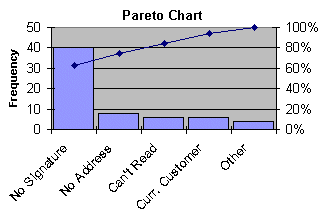
      • Pareto Chart – type of bar chart, prioritized in descending order of 
      magnitude or importance from left to right.
      Image result for pareto chart

      • Gantt Chart – is an activity time chart.


      Graphs

      • Pictures that help us understand data.
      Image result for graph

      Types of Graph


    • Circle Graph – recommended for showing parts of whole. 


      • Image result for circle graph
        • Bar Graph – use in comparing the magnitude of similar items at different 
        ties or seeing relative sizes of the parts of a whole.


        • Pictorial Graph – make use of picture symbols.
        Image result for pictorial graph
        • Graphic Organizers – you met several graphic organizers in your 
        subject, principles of teaching.
        Image result for graphic organizer

        Maps

        • Is a representation of the surface of the earth or some part of it.

        Types of Maps


        Physical Map – altitude, temperature, rainfall, precipitation, vegetation

         and soil.


        Relief Map – three dimensional represents and show contours of the 

        physical data of the earth or part of the earth.
        Image result for relief map

        Political Map – gives detailed information about country, provinces, 
        lakes, rivers etc.
        Image result for political map
        Lesson 12: 
        The Power of Film, Video and TV in the Classroom
        “Next to the home and school, I believe television to have a more profound influence on the human race than any other medium of communication.” – Edgar Dale
        Image result for tv


        The Film, the Video and the TV are indeed very powerful. Dale (1969) says, they can:

        • Transmit a wide range of audio – visual materials, including still pictures, films, objects, specimen and drama.
        • Bring models of excellence to the viewer.
        • Bring the world of reality to the home and to the classroom through a “live” broadcast or as mediated through film or videotape.
        • Make as see and hear ourselves world events as they happen.
        • Be the most believable news source.
        • Make some programs understandable and appealing to a wide variety f age and educational levels.
        • Become a great equalizer of educational opportunity because programs can be presented over national and regional network.
        • Provide us with sound and sights not easily available even the viewer of a real event though long shots, close up, zoom shots, magnification and split screen made possible by the camera.
        • Can give opportunity to teachers to view themselves while they teach for purposes of self-improvement.
        • Can be both instructive and enjoyable.


        While the film, video and TV can do so much, they have their own limitation.

        • Television and film are one-way communication device. Consequently, they encourage passivity.
        • The small screen size puts television at a disadvantage when compared with the possible size of projected motion pictures.
        • Excessive TV viewing works against the development of child’s ability to visualize and to be creative and imaginative, skills that are needed in problem solving.
        • There is much violence in TV.


        Basic Procedure in the Use of TV as a Supplementary Enrichment


        1. Prepare the classroom.
        2.  Pre-viewing Activities:
        a.    Set goals and expectation.
        b.   Link the TV lesson with past lesson and / or with yur student’s experience for integration relevance.
        c.    Put the film in context.
        d.   Point out the key points they need to focus on.

        3. Viewing

        a.    Don’t interrupt viewing by inserting cautious and announcements you forget to give during the previewing stage.
        b.   Just make sure sights and sounds are clear.

        4. Post – Viewing

        To make the feel ease begin by asking the following questions:


        • What do you like best in the film?
        • What of the part film makes you wonder? Doubt?
        • Does the film remind you of something or someone?
        • What question are you asking about the film?


        Image result for EFFECT OF TV
        • The film, video, and TV are powerful instructional tools.
        • When they are used appropriately and moderately, they can make the teaching-learning process more concrete, lively, colorful and interactive.
        • Misuse and abuse of their use in the classroom and even at home has far reaching damaging effects in the development of children’s imaginative and thinking powers and sensitivity to human life.


        Image result for NEWS TV CARTOONING


        The Effects of TV
        • We agree that the TV can give a more accurate, more lively and more colorful presentation of a difficult topic in physics for instance when the one who teaches the topic is inexperienced and can only make use of still pictures in black and white as visual aid.
        • We are aware of the numerous educational benefits of the use of the TV.
        • The effect of TV depends on how it is used.
        • When used in excess, it can also impair the development of children’s ability to visualize, to be creative and imaginative. Worse, is when children gets exposed to violence in TV.


        Social psychologist Craig A. Anderson gave this testimony to the US senate on March 21, 2000:

        “The Media violence effect on aggression is bigger than the effect of exposure to lead on IQ scores in the children, the effect of calcium intake on bone mass, the effect of homework 0on academic achievement, or the effect of asbestos exposure on cancer… high exposure to media violence is a major contributing cause of the high rate of violence in modern US Society.”

        Let us use the TV appropriately and moderately so that we can take advantage of its advantage and mitigate its disadvantages.

        Using Video in the Classroom

        Image result for Using Video in the Classroom

        Does video have a place in the classroom?

           According to a 1992 study conducted by Synergy Broadcast Systems, “Video in the classroom is an important tool used to support the four key components of learning.”

        Four Key Components

        • Active Engagement
        • Participation in Groups
        • Frequent Interaction and Feedback
        • Connection to Real-World Experts


        Why Use Video in the Classroom?

        • We remember 70% to 90% of what we see, hear and do.
        • Using video, creating content and producing an end result that will allow students to do all three.


        Technology has changed

        • Due to changes in technology, video tools are more accessible than ever before.
        • Students will be using technology throughout the course of their scholastic career. The sooner they have access, the better.


        Ways video helps assist classroom assignments:

        • Supports differentiation.
        • Stimulates classroom discussion.
        • Reinforces readings.
        • Provides creative output.
        • Allows students to interact with classrooms throughout the world.


        Recommended Video Tools and Resources

        • iMovie
        • Sony Vegas
        • Animoto
        • Gizmoz
        • YouTube
        • Jing


        Advantages

        • Video can be utilized to illustrate how something works.
        • Video provides information in detail that text and graphic cannot.
        • Video can grab student’s attention.
        • Video can show real life examples.
        • Video stimulates discussions.
        • Video can appeal to the learning styles of visual learners.
        • Video could enhance problem-based learning.


        Using Film in the Classroom

        At Film Education, we believe that films is a power tool that can help learners understand and access that world and other worlds.

        • Real and imagined
        • Parts of our remit is to in courage young people to learn by viewing and to be critical consumers of what they see as an ability and analyze film is an empowering skill and one that is increasingly important for young people.
        • Film Education’s website and materials offer teacher a wealth resource for incorporating film into the elementary school to high school.
        • Let face it, using film – whether watching them or actually making them – is often a heat motivator for students of all ages.
        • There are teacher all over the world who are including youtube or film clip in their lesson.


        Three (3) tips for using Film in the Classroom

        1. You tube is your friend, but Clean tube is better.
        2. Keep it short and upbeat, generally there’s a law of diminishing returns regarding the length of film.
        3. Use it at the start or the end of the lesson.


        Three (3) tips for Making Films in Class

        • Teaching students how to make film.
        • Build in play time let students muck around with the different titles and effect.
        • Sometimes, it’s not about quality it’s all about the story.


        How can Film help you Teach English

        • Learning from films is motivating and enjoyable.
        • Film provides authentic and varied language.
        • Film gives a visual context.
        • Variety and flexibility.
        • Exposes the student to spoken language.
        • Useful in teaching vocabulary.
        • It contextualizes language through the flow of images, making it more accessible.
        • Film also offers an enlargement of our knowledge of the world and the cultures that it contains.


        How to use Films in Teaching

        1. Find something you like.
        2. Choose something you can understand 70-90% (without substitutes or other help)
        3. Don’t use subtitles in your own language.
        4. Watch several times.
        5. Start with English subtitles, then watch again without subtitles.
        6. You don’t have to spend a lot of time ten minutes a day is better than nothing.